Correct proportion
The carried-photo format is 3.5 cm wide × 4.5 cm high. The current digital guidance specifies 630 × 810 px—the same ratio.
INDIAN PASSPORT PHOTO MAKER · A4 PRINT UTILITY
Crop to the 35 × 45 mm preset, remove the background locally, and download a single-photo JPEG or an A4 PDF/JPEG sheet. No account or payment required. Check your application instructions; third-party printing is optional.
Drag to position · use the slider to zoom
Photos you open are saved only in this browser so you can resume later. Clear them after use on a shared device.
Previous photos on this device
Run this first, then crop and scale below. Processing stays on this device.
After alignment: drag to crop · pinch or use Scale · twist to straighten
Framing guide
The latest Passport Seva ICAO guidance asks for a white background, a direct gaze, natural expression, open eyes, and the head/top of shoulders filling roughly 80–85% of the image.
A4 · 300 DPI
Your arranged sheet
will appear here
For direct printing choose Actual size / 100% and turn off “Fit to page”.
Step 2 Open a print service and upload your saved PDF.
If Safari opens a PDF preview, use Share → Save to Files. Choose colour, A4, and Actual size / 100% where available.
Check availability for your address and measure a print before use: each photo should be 35 × 45 mm. Your PDF goes to the provider only if you choose to share or upload it.
OPTIONAL SUPPORT
Your photos and downloads are always free. If this saved you time, a one-time contribution helps keep the tool running.
Minimum ₹49 · whole rupees only
BEFORE YOU PRINT
The carried-photo format is 3.5 cm wide × 4.5 cm high. The current digital guidance specifies 630 × 810 px—the same ratio.
Use a close crop with the full head visible, centred and level. Keep both edges of the face clear.
Use even light, natural skin tones, no shadows or red-eye, and remove glasses if they reflect light.
For regular in-India applications, the centre captures the photograph. Passport Seva specifically asks applicants below age four to carry a 35 × 45 mm photo.
This utility prepares a print layout; it does not validate biometric compliance or guarantee acceptance. Requirements can vary by service and mission—check the instructions for your exact application.
A4 SHEET TEMPLATE
This tool builds the A4 template around your portrait. Keep the Indian 35 × 45 mm preset—also written 35mm x 45mm—and the page fills with passport-size cells; there is no separate Word, PDF or Photoshop template to download and resize.
The default passport size photo A4 sheet holds 30 copies in 5 columns × 6 rows, with 5 mm page margins and 3 mm gaps. Change the photo size, margin or gap in Sheet settings and the preview updates before you download. The result is an A4 passport photo template you can save as a PDF or JPEG and reuse with a new portrait.
Custom sizes, margins and gaps change the layout and copy count.
ILLUSTRATED DEMO
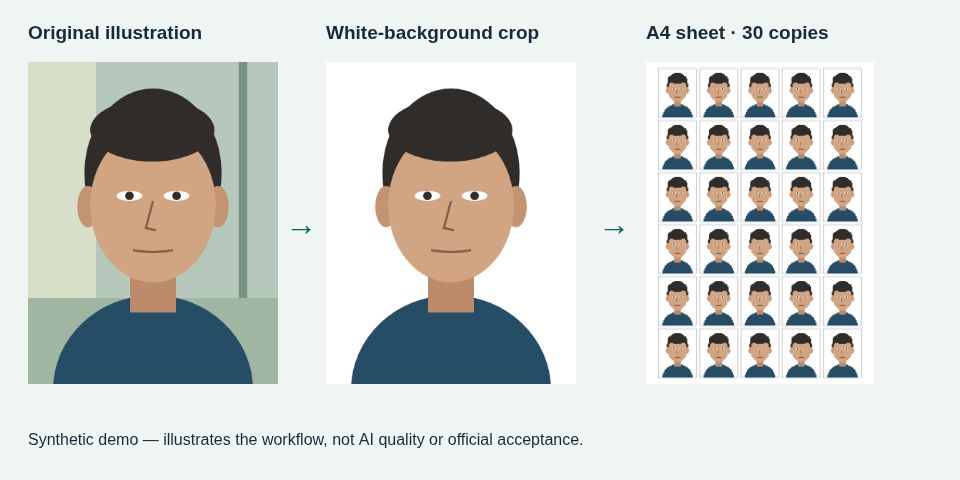
Download the small demo JPG (9 KB) · Download the workflow illustration (47 KB)
The demo is original artwork, not a real person's photo. Your own photo is processed locally; drafts can be cleared on shared devices.
HOW IT WORKS
An Indian passport photo is 35 × 45 mm (35mm x 45mm). Current digital guidance uses 630 × 810 pixels, which has the same 7:9 proportion.
No. Cropping, background removal, layout and export happen locally. Photos are saved only in this browser so you can resume, and you can clear them from the upload panel.
For many Passport Seva Kendra appointments the photograph is captured at the centre. Check the requirements for your application, especially for children and applications outside India.
Yes. Editing, single-photo JPEGs and A4 PDF/JPEG downloads are free, without an account or watermark. Support contributions are optional.
Choose Download single photo for an individual 300 DPI JPEG. Choose Download PDF for an A4 print sheet, or Download JPEG for the same sheet as an image. A 300 DPI print JPEG does not automatically meet a portal's pixel dimensions or file-size limits; check its instructions.
A passport-size photo A4 sheet fits 30 copies by default: the 35 × 45 mm preset with 5 mm margins and 3 mm gaps gives 5 columns × 6 rows. Custom dimensions, margins and gaps change the count; check the preview.
Choose A4 and Actual size / 100%. Turn off Fit to page and shrink-to-printable-area. Measure a sample with a ruler before printing more; a driver or print service may override scaling.
Yes. Choose a clear phone portrait in JPG, PNG, WebP, BMP or GIF, or use local HEIC/HEIF conversion. AVIF support depends on your browser. Uploads are limited to 40 MB; browser profiles do not certify every physical phone.
A passport photo A4 template is an A4 page laid out with repeated passport-size photo cells. This tool generates one from your portrait: the Indian 35 × 45 mm preset fits 30 copies in 5 columns × 6 rows with 5 mm margins and 3 mm gaps. You can change the photo size, margins and gaps before downloading the PDF or JPEG.
Yes. To print an Indian passport photo online, download the A4 PDF and upload it to a print service that accepts PDFs. Check that it prints on A4 at Actual size / 100% and does not fit the page to its printable area. This app offers optional handoff to Blinkit Print Store, Zepto Print Store or Swiggy InstaPrint where available; measure a test print before ordering more.
Download the A4 PDF, then print it at home on A4 at Actual size / 100%, or upload the same PDF to a print service. After your sheet is ready, this app can hand the saved PDF to Blinkit Print Store, Zepto Print Store or Swiggy InstaPrint where available. Check colour, paper size and scaling before ordering, and measure a test print—a provider can override your settings.
Requirements can change. Confirm your application instructions on the official Passport Seva website. Read the sizing and A4 printing guide, or explore the build journey and future roadmap.